Entry · Ref KWSRBHRG
Settings to review before relying on man down detection
- Posted
- 2026-11-28
- Last amended
- 2026-11-28
- Account
- @safershifts
Automatic worker alerts can make lone work safer, but only when the settings match the real working day. A device that detects a fall or a long period of no movement is useful in principle. The practical value comes from choosing thresholds, contacts and response steps that people will actually follow.
Before rolling out wearable lone worker alarms, look past the basic alert feature. Check what triggers an alert, where the alert goes, what happens if the first message is missed and how workers are expected to respond. A short review now can prevent confusion later, especially when a real event is stressful and time matters.
Start with the work pattern, not the device
The first setting to review is the way the alarm fits the job. A worker who spends long periods seated at a desk has a different movement pattern from someone walking between sites, driving, climbing ladders or working in a noisy plant area. man down detection depends on recognising unusual stillness or a possible fall, so normal stillness needs to be understood before thresholds are chosen.
Look at the tasks that make up a typical shift. Are there quiet periods where a worker may stay still for several minutes by design? Are there tasks where a device may be left on a bench, placed in a vehicle or covered by clothing? Those details matter because a system cannot tell the difference between a genuine man down event and a harmless pause unless the settings and work practices reduce false signals.
Where possible, link the review to the risk assessment. The risk assessment should already describe who works alone, where they work, what could go wrong and how help can reach them. Alert settings should support that plan rather than sit beside it as a separate technology decision.
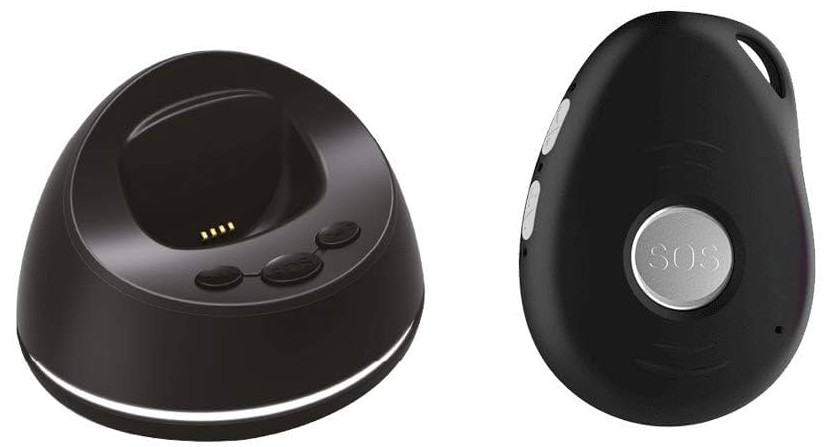
Points to check before automatic alerts go live
- Inactivity timer. Check how long the device waits before treating no motion as a concern. Too short, and routine stillness may create nuisance alerts. Too long, and a worker needing help may wait longer than is reasonable.
- Impact detection. Review how a fall or sudden impact is identified and what the wearer can do if the alert was triggered during normal work. Clear user instructions reduce the chance that a false alert is ignored or mishandled.
- Alert escalation. Confirm what happens when an alert is not acknowledged. A good arrangement does not rely on one person seeing one notification at the right moment.
- GPS location. Check whether location information is included with the alert and how it is used by the person responding. Location detail is most useful when responders know how to interpret it.
- Two-way voice. Test how voice contact is intended to work, including what happens if the worker cannot speak. Alert settings should still make sense when the wearer is distressed or unable to answer.
Mercari Lone Worker NZ can be considered as part of a wider conversation about how wearable alarms support New Zealand workplaces, but the settings still need to be judged against the work itself. A device feature is only one part of a safe arrangement. The rest is the set of decisions around it: who receives alerts, what they do, and how the system behaves when conditions are not ideal.
Check who receives the alert
An alert is only helpful if it reaches someone able to act. Review the emergency contact arrangement carefully. A single contact may be enough in a small team, but only if that person is available for the whole period lone work is taking place. If they are driving, in a meeting, off shift or out of signal range, the response plan may break at the first step.
Consider a staged approach. The first notification may go to a supervisor or nearby colleague who can make contact quickly. If there is no response, alert escalation can move the message to another contact or a monitoring point. The aim is to avoid a single point of failure without creating so many notifications that nobody takes ownership.
Each contact should know what information may arrive with the alert and what action is expected. That includes how to respond to a no motion detection alert, how to attempt voice contact, when to seek help and when to involve emergency services. Clear roles matter more than a long contact list.
Set thresholds that suit real conditions
Thresholds are a balancing act. A sensitive setting may generate alerts during ordinary work. A relaxed setting may delay attention when something is wrong. The right choice depends on the environment, the task, the worker's ability to respond and the time it takes for help to arrive.
For example, a worker in a warehouse may move often enough that a short inactivity timer works well. Someone doing inspections, paperwork or monitoring equipment may need a longer window. A worker in a remote area may need a plan that recognises travel time for assistance, rather than relying only on a quick notification.
Review the settings after changes in duties or site conditions. Seasonal work, new equipment, altered shifts and different routes can all change movement patterns. A setting that suited one role may be awkward for another. If the same team carries out varied tasks, it may be worth comparing settings by role instead of applying one pattern to everyone.
Make the worker response clear
Automatic alerts work best when the wearer knows what to expect. Workers should understand how to turn an alert on and off, how to cancel a false signal, what sounds or messages may appear and what to do after an alert is acknowledged. Confusion at the moment of a fall or a false trigger can slow the whole response.
Training does not need to be complicated. It does need to be specific. A worker should be able to explain, in plain terms, what will happen if they stop moving for too long, if a possible impact is detected or if they press an emergency button. They should also know that a cancelled alert may still need reporting if it revealed a process problem.
In Mercari Lone Worker NZ discussions about wearable lone worker alarms, the practical question is often how the alert fits into the day. That means checking whether the device is worn consistently, whether clothing or equipment interferes with detection, and whether workers understand the response steps. These points can matter as much as the technical setting itself.
Review connectivity and location detail
Where a device sends an alert and how location is shared should be reviewed before alerts are relied on. Wireless coverage can vary between workplaces, vehicles, rural areas and buildings. If alerts depend on a connection, the plan should account for gaps and include another way to check on a worker when contact fails.
GPS location can help a responder understand where to go, but it is not a substitute for a clear site plan. Check whether the location shown is precise enough for the setting. In multi-level buildings, dense sites or areas with poor signal, location detail may need support from the worker, a supervisor or a known work schedule.
Also review privacy expectations. Workers should know when location information is used, who can see it and why it is collected. A transparent approach helps build trust and reduces the chance that devices are left behind or switched off.

Practise the response path
A written plan can look sound while still leaving gaps. A short exercise can reveal whether contacts understand the alert, whether escalation reaches the right person and whether the worker knows how to respond. Keep it simple and focused on communication rather than added risk. The purpose is to find weak links before a real emergency.
After any test or real alert, review what happened. Did the alert arrive as expected? Was the location useful? Did the worker know what to do? Was the first contact available? If a false alert occurred, was the cause clear? These questions lead to useful adjustments without turning the process into a blame exercise.
Automatic worker alerts are most effective when settings, people and procedures line up. Check the inactivity timer, impact detection, escalation, contacts, connectivity and worker response before depending on man down detection. The aim is not more alerts. It is a clear path from a detected problem to a response that makes sense for the workplace.